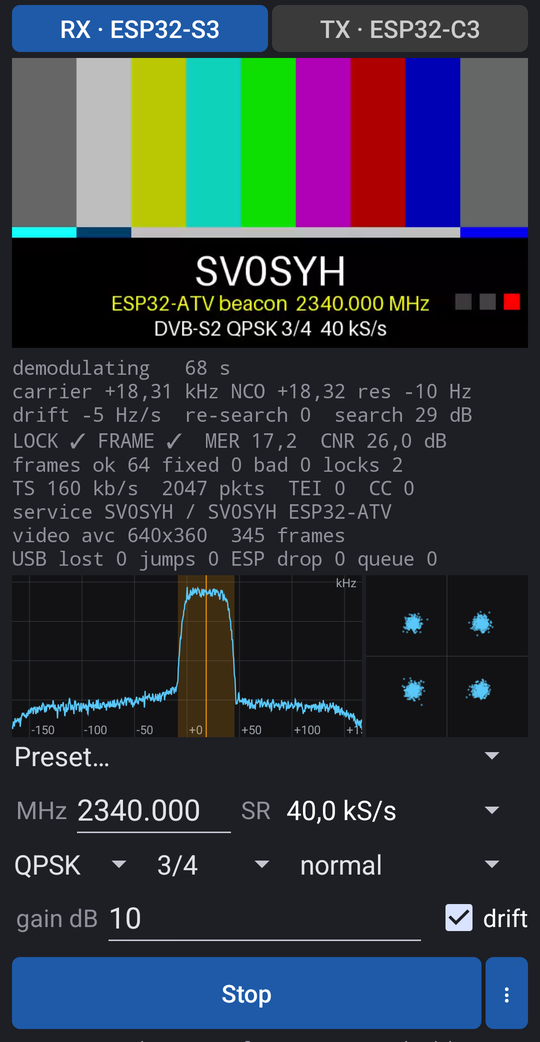
ATV RX/TX is a DVB-S2 receiver (and transmitter) for amateur television on 13 cm. The radio is a Seeed XIAO ESP32-S3 on USB-OTG; an Android phone or tablet demodulates (leandvb), decodes the LDPC (ldpc_tool) and shows the picture together with MER, constellation and stream information. Its counterpart is the stand-alone ESP32-C3 beacon (ESP32-DATV-SA) – and the same app also transmits: with a XIAO ESP32-C3 on USB-OTG it sends a test card, the phone’s camera or a picture / video from the phone live as DVB-S2 (switch RX | TX at the top).
⚠ The transmitter works on the 13 cm amateur radio band (2.3–2.45 GHz). Transmitting requires an amateur radio licence. Transmit only with your own callsign, on frequencies and at power levels your licence and national band plan allow (2345 MHz lies in the ATV segment of the IARU Region 1 band plan). The band around 2.4 GHz is shared with Wi-Fi and other services – without a licence, transmitting is illegal and disturbs others. Receiving alone needs no licence.
Beta. The app is free software under the GNU GPL v3.
| part | note |
|---|---|
| Seeed XIAO ESP32-S3 or S3 Plus | with an external antenna on U.FL (2.3 GHz – the Wi-Fi kit antenna is fine on a desk) |
| USB-C OTG cable or adapter | the phone must support USB host (OTG); the S3 is powered by the phone |
| Android 9+, arm64 CPU | tested: OnePlus 10 Pro (Android 16) |
| for TX: Seeed XIAO ESP32-C3 | with an antenna on U.FL; the firmware comes from the app or the web flasher |
| a computer with Chrome / Edge | optional: the app writes the firmware into both boards itself |
From the app (no computer): install the app first (section 2). Connect the board through OTG, open the menu ⋮ → Firmware (S3 / C3) and tap Write firmware into the connected board. The app puts the board into its ROM loader, which tells the chip – ESP32-S3 → receiver, ESP32-C3 → transmitter, they cannot be mixed up – downloads the current firmware from the web (kept for use without a network), writes it with a progress bar, checks it (MD5) and restarts the board. Android asks for USB access twice (the board appears again in its loader). A new firmware on the web needs no new app. Check versions on the web shows the current versions and which of your boards (the ones the app has written or talked to) have an older firmware.
From the browser: the web flasher in Chrome or Edge on a computer – connect the XIAO with a data cable, hold BOOT, tap RESET, release BOOT, click the button for the receiver (S3) or the transmitter (C3), choose the port and confirm. Tap RESET when it is done. (Erasing there also deletes the C3’s carrier calibration, see section 4.)
From the command line (this repository, Linux): S3
third_party/ESP32-DATV-RX/tools/install.sh, then
rx/flash_rx_xiao.sh; C3 tx/build_c3_web.sh or
tx/flash_tx.sh (README).
The boards enumerate as 303a:1001 and start their
firmware at every power-up.
atvrx-….apk; checksum in SHA256SUMS).Updates: once a day the app looks for a new version
on GitHub and for newer firmware for the boards it knows, and says so in
a dialog (Download opens the release; Skip this
version). Menu ⋮ → Check for updates checks now, Daily
update check: on/off switches it off. A new APK installs over the
old one (same signature), the settings stay. Automatic updates without
the dialog: Obtainium with the
address https://github.com/ok1cdj/ESP32-ATV (enable
include pre-releases).
FRAME=short) and a Beacon … short preset cut the
wait by 4, to 5–8 s, at the same sensitivity (short
frames).Sound plays with the picture: AAC (also HE-AAC, what this app’s TX sends) and MPEG audio (MP2 – what many DATV transmitters and ESP32-DATV-SA’s video converter send – and MP3). The picture follows the sound’s clock, so the two stay together also while ldpc_tool hands out frames in batches. ⋮ → Sound off / on mutes it. AAC in LATM and AC-3 are not supported (the status says so); without sound the picture is shown as it comes, as before.
You can turn the screen off or switch to another app – reception goes on in the service (sound too). Stop it with Stop in the app or in the notification.
Recording: ● REC next to Start
(while receiving) writes the received transport stream into a file
exactly as it comes, nothing transcoded – picture, sound and service
name as sent, about 20–300 MB an hour depending on the rate. It starts
at the next key frame of the picture (with the stream’s tables before
it), so the file plays cleanly from its first byte; a gap in the signal
is a gap in the file. Next to it a .srt subtitle file
of the same name: every second the time, MER, CNR, carrier offset and
frames – the player shows them over the picture, handy for range tests.
■ (with the running time) or Stop REC in the
notification ends it; stopping reception ends it too, and it stops
itself when the storage is nearly full. Where: Download/ATV
RX/ (Android 10+,
e.g. ATV_2026-10-18_153012_2345.000MHz_50k_SV0SYH.ts);
Android 9:
Android/data/com.ok1cdj.atvrx/files/Movies/ATV RX/. Play it
with VLC or mpv (phone or PC; VLC picks up the .srt by
itself; on Linux VLC needs vlc-plugin-dvb and
vlc-plugin-ffmpeg, a black picture:
Hardware-accelerated decoding off) – the phone’s gallery
usually cannot play .ts.
| line | meaning |
|---|---|
carrier |
carrier offset from the tuned frequency; NCO = software
correction, res = the residual the demodulator still
sees |
drift … Hz/s |
how fast the app is following the oscillator drift (ESP32 boards have no TCXO; the C3 moves by kHz, up to some 260 Hz/s, while warming up) |
re-search |
how often the signal was lost and searched again (10 s – at low rates 2.5 LDPC batches – without a good frame) |
LOCK, FRAME |
demodulator lock and DVB-S2 frame sync (✓ / ✗) |
MER |
modulation error ratio in dB – the main quality figure; QPSK 3/4 needs about > 5 dB, 8PSK 3/5 > 10 dB |
CNR |
carrier-to-noise ratio (only when the sample rate is > 3× the symbol rate, i.e. up to 100 kS/s) |
frames ok / fixed / bad |
frames without errors / corrected by BCH / not decoded |
TS, TEI, CC |
transport stream rate (10 s average), packets with errors, continuity counter breaks |
service, video |
service and provider name from the SDT, codec and resolution;
A/V sync = the picture follows the sound,
late … ms = it comes later than its sound |
audio |
the sound: codec, rate, channels ((off) = muted);
… not supported for LATM / AC-3 |
USB lost, ESP drop,
queue |
losses on USB, in the ESP32-S3 and in the queue to the demodulator – should be 0 |
| constellation (square) | symbol points: QPSK 4 clusters, 8PSK 8 clusters; a ring = too little signal or phase noise |
The transmitter firmware from the web (section 1, ESP32-ATV’s fork of ESP32-DATV-SA, PolyForm Noncommercial) transmits nothing by itself until you store a beacon with your callsign in it:
Notes:
BDC, measured with rx/cal_dc.py --save and
the S3 on a PC) and applies to the beacon too; writing firmware from the
app keeps it, the web flasher’s erase deletes it. It is valid for one
frequency.tx/make_flash_loop.py VIDEO --baud 40000 --frame short --call YOURCALL -o loop.bin
makes a loop of any video file, tx/c3_vidw.py loop.bin
stores it over USB, tx/c3_vidw.py --erase removes it.
Developers can still build a firmware with a built-in test card
(tx/make_beacons.sh, tx/flash_tx.sh,
README).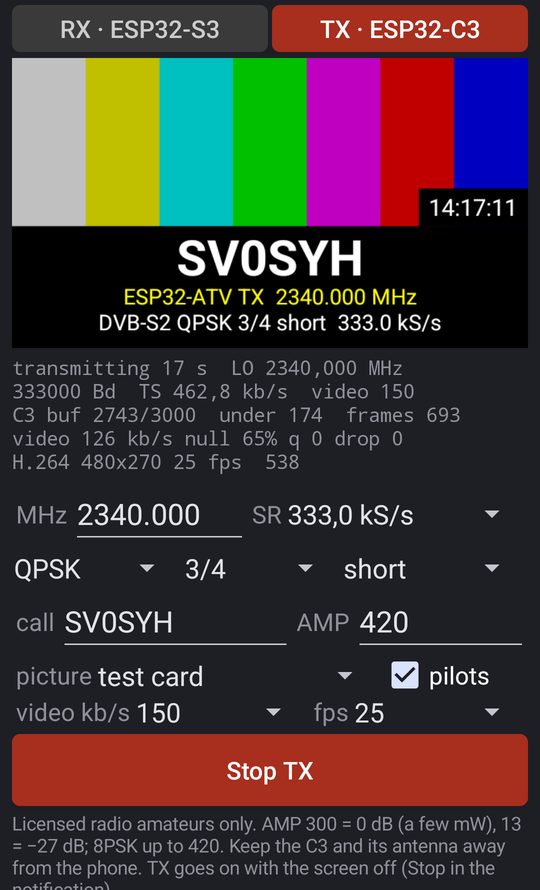
The phone encodes the picture (H.264), the transport stream and DVB-S2 itself and streams the symbols to the C3, which only modulates (its PC mode). The C3 needs the transmitter firmware (section 1); a command from USB stops a running beacon and starts the live mode.
BDC) and starts it; the status shows the C3 buffer (it
should stay near 3000), the TS and video rates. TX runs in the
background with the screen off; stop it with Stop TX or
in the notification.AMP is the peak amplitude the C3 drives its modulator with, in DAC codes (1–480) – a digital drive level, not a measured power. It scales the voltage: level = 20·log₁₀(AMP / 300) dB.
| AMP | level | use |
|---|---|---|
| 480 | +4 dB | maximum; expect distortion (spectrum regrowth, lower MER) |
| 420 | +3 dB | default for 8PSK in ESP32-DATV’s PC tools; check the MER at the receiver |
| 300 | 0 dB | default for QPSK, full level (a few mW, not measured) |
| 95 / 30 | −10 / −20 dB | on the desk with the antennas close (300 can overload the receiver) |
| 13 | −27 dB | the original beacon’s default; sensitivity tests |
The camera picture turns upright the way you hold the phone (landscape fills the frame) and carries the callsign and the mode in a strip at the bottom.
Picture / video file: File… opens the phone’s file picker (pictures and videos; no storage permission, the app keeps the choice). A picture is sent whole (black bars where its shape differs from 16:9), a video loops endlessly at its own pace, turned upright by its rotation tag (phone videos shot upright). callsign puts the same strip as the camera’s over it (on by default: the station’s identification; turn it off if the picture carries it). Sound from the video plays its sound track in sync with the loop (up to 10 minutes); a video without sound, or a picture, sends none. The preview shows the file while TX is stopped. Any resolution works: the app shrinks it to the video size (at most 640×360).
Sound is AAC: HE-AAC up to 32 kb/s, AAC-LC above. auto sends none below 80 kb/s of TS (40–50 kS/s: the picture needs the bits; choose 8–16 kb/s to send it anyway), 24 kb/s up to 200 kb/s, 64 kb/s above; the sound’s bits come off the video’s. Picture and sound carry time stamps from the moment they were captured, so they stay together (measured within 20 ms; on the bench lip sync OK at 333 kS/s). The app asks for the microphone on the first Start with it; the sound goes on with the screen off.
Video bit rate and frame rate are automatic (about 70 % of the TS rate; 320×180 5 fps at 40–66 kS/s, 640×360 15 fps at 333 kS/s) or chosen from a list (auto or 50–400 kb/s, 2–30 fps).
Receive it with a second phone, the PC
(rx/rx.sh 333000 --frame short) or any DVB-S2 receiver.
8PSK: use normal frames for leandvb-based receivers (they do not decode
short 8PSK).
Tested on the bench: QPSK 3/4 50 kS/s short MER 17 dB, 333 kS/s
MER 15 dB; 8PSK 2/3 333 kS/s MER 16 dB. With sound: 333 kS/s camera +
microphone (AAC 64 kb/s), 66.7 kS/s CW ID (HE-AAC 24 kb/s), 40 kS/s mic
+ CW ID at 12 kb/s, a stored beacon with CW ID; the PC
(rx/rx.sh) plays the sound too.
The C3 leaks its carrier: a tone in the middle of the signal (about −34 dBc) that limits reception at low levels. The app nulls it with the S3 as the measuring receiver: connect both boards through a USB hub (a powered one is better) and choose menu ⋮ → Transmitter calibration (S3 + C3). The first time it asks for access to both and finds out which is which (by the MAC in the USB serial number; it remembers it). The C3 transmits only its leakage on the frequency you set (no modulation, the PA off – still a transmission: licensed radio amateurs only), keep the antennas some distance apart so that the S3 is not overloaded. After the warm-up (60 s: the C3’s frequency drifts after it starts) the search takes about 20 s and typically takes 20 dB off; Save stores it in the C3 (for that frequency) and in the app. The leakage moves each time the C3 starts (by about 2 DAC codes), so a stored value is worth less, about 9 dB: for the best result calibrate just before transmitting and leave the C3 plugged in (the app does not reset it, so the calibration holds until the C3 loses power). A firmware upload from the app keeps the stored values. Details and measurements: LO calibration.
| symptom | try |
|---|---|
| the S3 on a USB hub: MER jumps, many locks | the hub drops samples (above all one shared with a headset): S3 straight into the phone / computer |
| ESP32-S3 not connected | a data cable (not charge-only), OTG enabled on the phone, firmware
written (board = 303a:1001) |
| searching: no signal | transmitter on, right frequency, antennas on both boards; more gain |
locked but bad grows |
too little signal (low MER) – more TX level / gain, better antennas; QPSK rather than 8PSK |
| MER drops with a strong signal | receiver overloaded – less gain |
USB lost / queue > 0 |
another OTG cable / adapter; no heavy apps at the same time |
| frames but no picture | wrong code rate or modulation in the preset (the beacon is QPSK 3/4) |
| TX: no ESP32-DATV answer | the S3 is connected, not the C3 (both are 303a:1001),
or the C3 has another firmware |
| TX: received weak, MER low | move the C3 and its antenna away from the phone |
| TX: no sound at 40–50 kS/s | auto sends none below 80 kb/s of TS – choose kb/s (12) next to sound |
RX: audio … not supported |
AAC in LATM or AC-3: the picture plays, the sound not (AAC in ADTS, MP2 and MP3 do) |
| the C3 transmits nothing on its own | no beacon stored yet: TX → Save as beacon in the C3 |
| this C3 firmware cannot store a loop | write the current firmware: menu ⋮ → Firmware |
| firmware: no network and no saved firmware | the first write needs the internet once; later the saved one works offline |
| TX log: C3 firmware …, on the web … | a newer transmitter firmware: menu ⋮ → Firmware |
| locked, good MER, but no frames: QPSK 3/5 or 5/6 normal frames, 8PSK short frames | leandvb does not decode these modes (known issue, also from a clean signal) – choose another code rate or frame size; the app warns |
Bugs and ideas: issues.
ATV RX/TX: GNU GPL v3. Parts: leansdr / leandvb (GPL-3), LDPC / ldpc_tool (Ahmet Inan, 0BSD-style), ESP32-DATV-RX (BSD-3-Clause), esp32-sdr-trx (0BSD, S3 firmware), minimp3 (CC0, MP2 / MP3 sound).